Free and Paid Boards
What makes a board paid, the three-person limit on free boards, and the features that show "Available to organizations".
What Makes a Board Paid
A board is paid when it is in one of an Organization's workspaces. Every other board is free: the boards you create for yourself live in your personal workspace, and they stay free even if you belong to an Organization.
What you can use depends on two things: whether you belong to an Organization, and whether the board is paid.
When Plans Apply
The limits in this guide apply only when your Stride instance switches its plans on. If plans are off, as they can be on a Stride you run yourself, every board works like a paid board: there is no member limit and nothing shows a lock.
To compare what each plan includes, see Pricing.
The Free-Board Limit
A free board holds up to 3 people. The owner counts as one of them, and so do read-only members and disabled accounts. AI agents don't count, because they work through API tokens rather than seats.
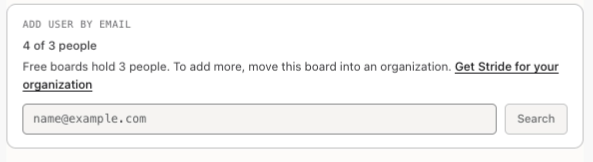
The board's Members window shows how many seats are in use. When a board is full, Stride refuses to add or invite anyone else, and the window offers Get Stride for your organization.
A board that already had more than 3 people when the limit started keeps all of them, as in the picture. Removing people always works, but nobody new can join until it is below the limit. Inviting Team Members covers adding people.
Locked Features on a Board
On a free board, some features show a lock and Available to organizations instead of working:
- Bulk actions: selecting several tasks to move, label or archive them at once.
- Telemetry: the telemetry fields in a task's Observability section.
- MCP: AI clients that connect to the board over MCP get a plan-required error instead of an answer.
Integrations are locked too (next step). Tasks, columns and members work as usual.

Integrations and Notifications
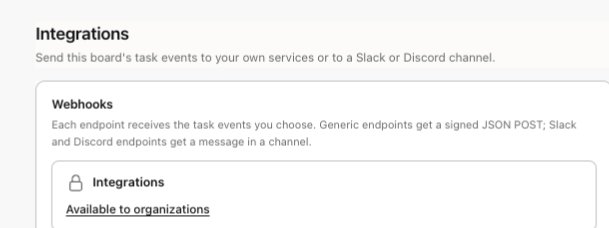
Integrations (webhooks and Slack or Discord messages) need a paid board. On a free board the Integrations window shows the lock and sends nothing. Endpoints already on the board are kept, and the switched-on ones are marked Paused until the board moves into an Organization.
Notifications need you to belong to an Organization, and they come only from paid boards. Without an Organization, your notifications page shows the lock, but tasks waiting for you are still listed in the Review queue and My Work.
Getting Organization Features
Click Available to organizations next to any lock to reach Get Stride for your organization on the Pricing page, where Talk to us emails the Stride team. Stride's admins set up Organizations, so there is no button for you to create one.
Once you belong to an Organization, single sign-on and workspaces unlock for you. Bulk actions, integrations, telemetry, MCP and notifications also depend on the board, so they stay locked on the boards in your personal workspace.
Making a Board Paid
To make a free board paid, an org-admin who owns it moves it into one of the Organization's workspaces with Move a board here. Everyone on the board must already belong to the Organization, and a board can't be moved back. Working in a Workspace walks through it.
You're all set!
You've completed all the steps in this guide.