Editing Many Cards at Once
Select several cards on a board, then move, assign, label or archive them in one step.
Who Can Use Bulk Actions
The board's owner and members with modify access see Select at the top of the board. Read-only members and people viewing a shared board don't.
When plans are on, bulk actions need a paid board, one in an Organization's workspace. A free board shows a Bulk actions lock with Available to organizations instead. See Free and Paid Boards.
Selecting Cards
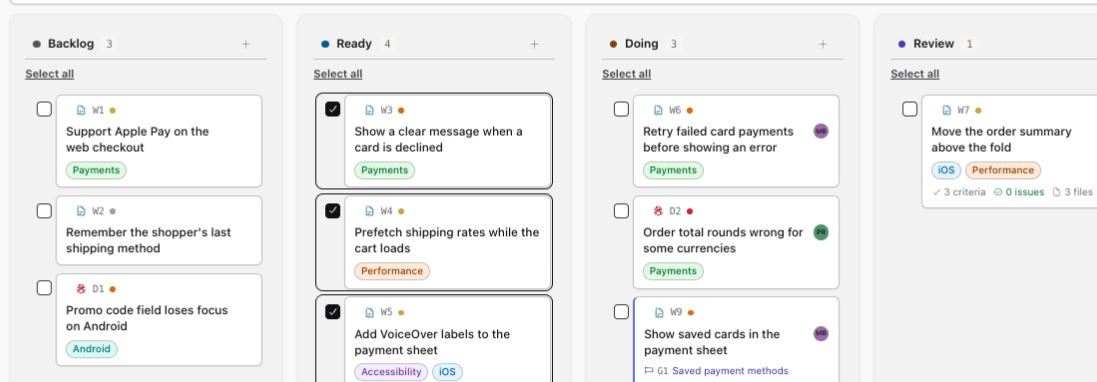
Click Select to show a checkbox on every card and the bulk bar above the columns, then tick the cards you want. Clicking a card ticks it too.
Select all at the top of a column ticks every card that column is showing, so a search or filter narrows it. Clear all unticks them. Esc unticks every card but leaves you selecting. Click Done selecting when you're finished.
Moving Cards
The bulk bar's buttons work once at least one card is ticked. Choose a column in Move to… and click Move. The cards go to the bottom of that column.
Goals are skipped, because a goal moves with its tasks. If the move would take the column past its WIP limit, nothing moves.

Assigning Cards
Choose a person in Assign to… and click Assign, or choose Unassigned to clear the assignee. Only people who can work on the board are offered, and each new assignee gets a notification. Goals are skipped.
Adding and Removing Labels
Choose a label in Add label… and click Add, or choose one in Remove label… and click Remove. These only appear once the board has labels, and they apply to goals as well.
Archiving Cards
Archive takes the selected cards off the board after you confirm. Goals are skipped. You can bring them back later, as Archiving Tasks explains. Clear selection unticks every card without changing anything.
All or Nothing
Each bulk action changes every selected card or none of them. If something gets in the way, like a full column or a card someone else just archived, the board shows a message and nothing changes.
You're all set!
You've completed all the steps in this guide.