Archiving Tasks
Take finished work off a board, find it again in the archive, restore or delete it, and export it as CSV.
Archiving a Card
Hover over a card and click its archive icon to take it off the board straight away, with no confirmation. Archiving a goal archives its tasks too. The board's owner and members with modify access can archive. To archive several cards at once, see Editing Many Cards at Once.
The Archive Page
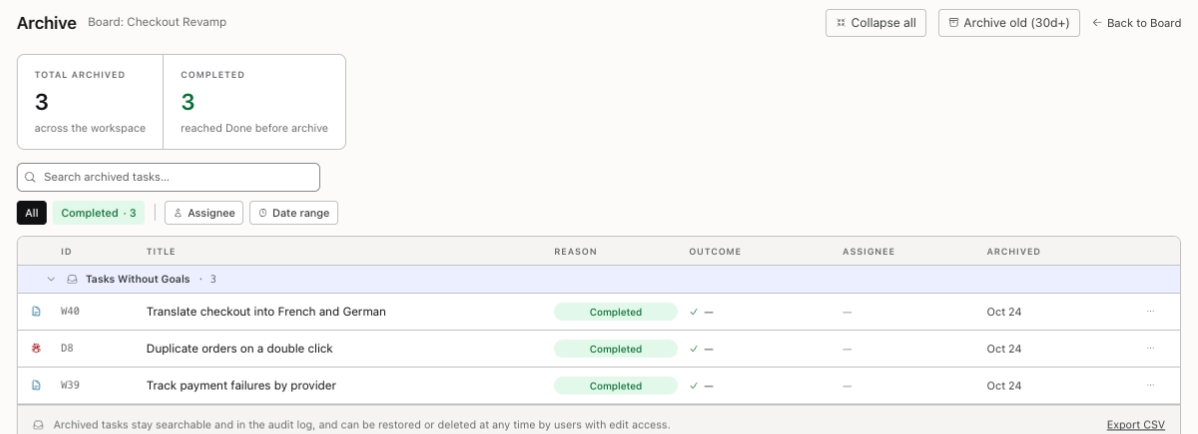
The Archive tab lists the board's archived tasks. Anyone who can open the board can open it.
- Total archived and Completed count them.
- Tasks are grouped under their goal, and the rest are under Tasks Without Goals. Collapse all and Expand all fold the groups.
- Back to Board returns to the board.
Searching and Filtering
Type in Search archived tasks… to search by title. The chips below narrow the list:
- All or Completed.
- Assignee: one person, or Unassigned.
- Date range: set From and To, then click Apply, or Clear. It uses the day each task was archived.
Restoring or Deleting a Task
Open a row's actions menu:
- Restore puts the task back on the board, at the bottom of the column it came from. If its assignee can no longer work on the board, the task comes back unassigned.
- Delete forever removes the task for good, after you confirm. It can't be undone.
The board's owner and members with modify access see both. Everyone else sees Read-only access.

Archiving Old Tasks
Archive old (30d+) archives every completed task on the board that was completed more than 30 days ago, whichever column it's in, after you confirm. The board's owner and members with modify access see it. To undo it, restore the tasks one at a time.
Exporting the Archive
Export CSV downloads every archived task on the board as a spreadsheet, whatever the page is filtered to. It has one row per task, with its ID, title, type, goal, assignee, archive reason, when it was archived and who archived it. Anyone who can open the board can export it.
You're all set!
You've completed all the steps in this guide.