Guide
4 min read
Understanding Cycle Time
Measure how long tasks take from the moment work starts until completion, and find opportunities to speed up delivery.
1
What Is Cycle Time?
Cycle time measures the duration from when a task is claimed (work begins) until it is completed. It answers the question: "How long does it take to finish a task once we start working on it?"
Shorter cycle times mean faster delivery and quicker feedback loops.
2
Navigate to Cycle Time
From the metrics dashboard, click Cycle Time to see the detailed view. You can also navigate directly from the board by going to Metrics → Cycle Time.

3
Reading the Chart
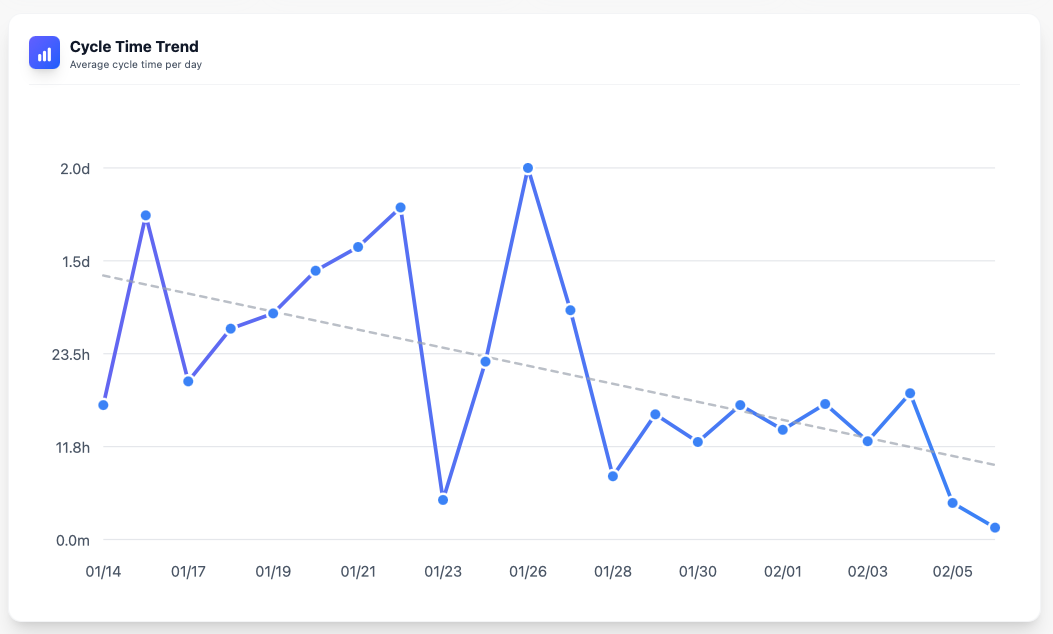
The cycle time chart shows how long completed tasks took. Look for:
- Average cycle time: Your typical delivery speed
- Outliers: Tasks that took much longer than usual may indicate blockers or unclear requirements
- Trends: Is cycle time improving, stable, or getting worse over time?
4
Reducing Cycle Time
To improve cycle time:
- Write clearer task descriptions and acceptance criteria
- Break large tasks into smaller, focused pieces
- Remove blockers and dependencies where possible
- Ensure tasks have all the context needed to start immediately
- Review the relationship between task complexity and actual cycle time to improve estimates
You're all set!
You've completed all the steps in this guide.