Guide
3 min read
Adding Your First Task
A step-by-step guide to creating tasks with all the essential fields.
1
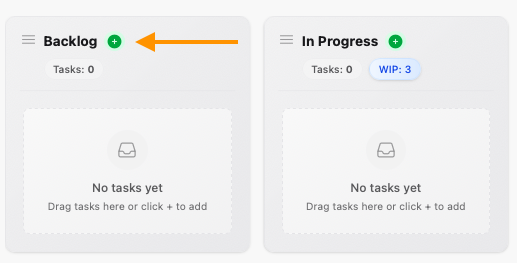
Open the Task Form
Click the <span class="hero-plus-circle-solid h-5 w-5 text-[var(--st-done)] inline-block"></span> button at the bottom of any column, or use the keyboard shortcut N when focused on a column.
2
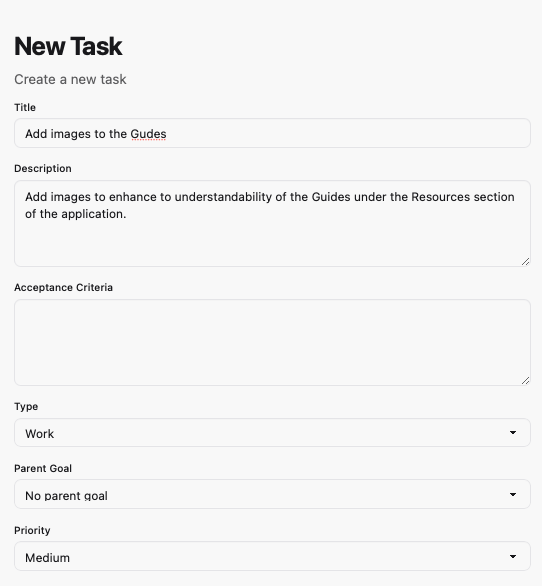
Enter Task Details
Fill in the essential fields:
- Title: A clear, action-oriented description
- Type: Work, Defect, or Goal
- Priority: Low, Medium, High, or Critical
- Description: Detailed context and requirements
3
Add Acceptance Criteria
Define what "done" looks like. Good acceptance criteria are specific, measurable, and testable. This helps both humans and AI agents understand exactly what's expected.
4
Save and Start Working
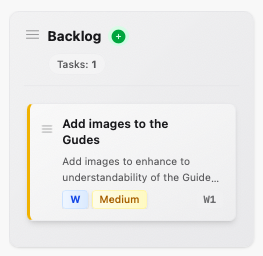
Click Create Task to add it to the column. The task is now ready to be claimed and worked on.
You're all set!
You've completed all the steps in this guide.