Configuring API Authentication
Set up API tokens for secure access to the Stride API from your applications.
Generate an API Token
Navigate to your board settings and click API Tokens. Complete the fields with paying special attention to the Agent Capabilities. More information about Agent Capabilities can be found at Agent Capabilities Reference.
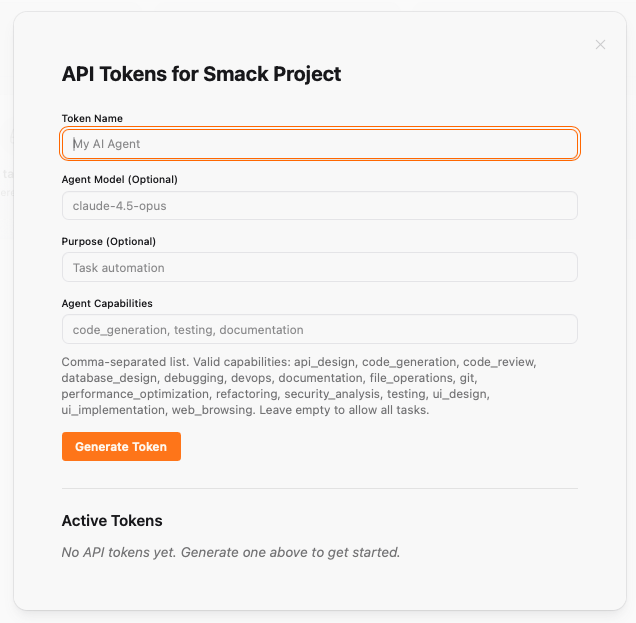
Complete Token Generation
Click Generate Token and Copy your token. You will not be able to see the token again so it is important to move directly to the next step.
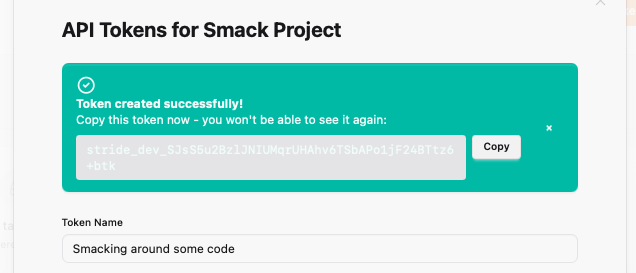
Create .stride_auth.md.
Create a .stride_auth.md file (add to .gitignore!). This file is typically created when an AI agent calls the onboarding endpoint. Paste the API token from the previous step into this file:
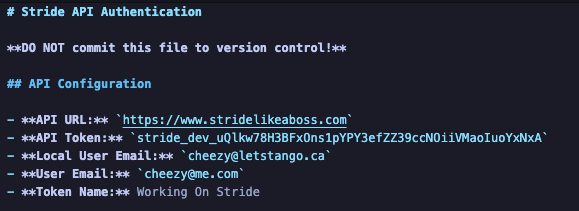
Using the Token
The AI agent will automatically use this token every time it calls Stride. There is nothing you need to do here.
Security Best Practices
- Never commit tokens to version control
- Use environment variables in CI/CD
- Rotate tokens periodically
- Use separate tokens for different environments
You're all set!
You've completed all the steps in this guide.